Nuke Survival Toolkit Release v2.2.0
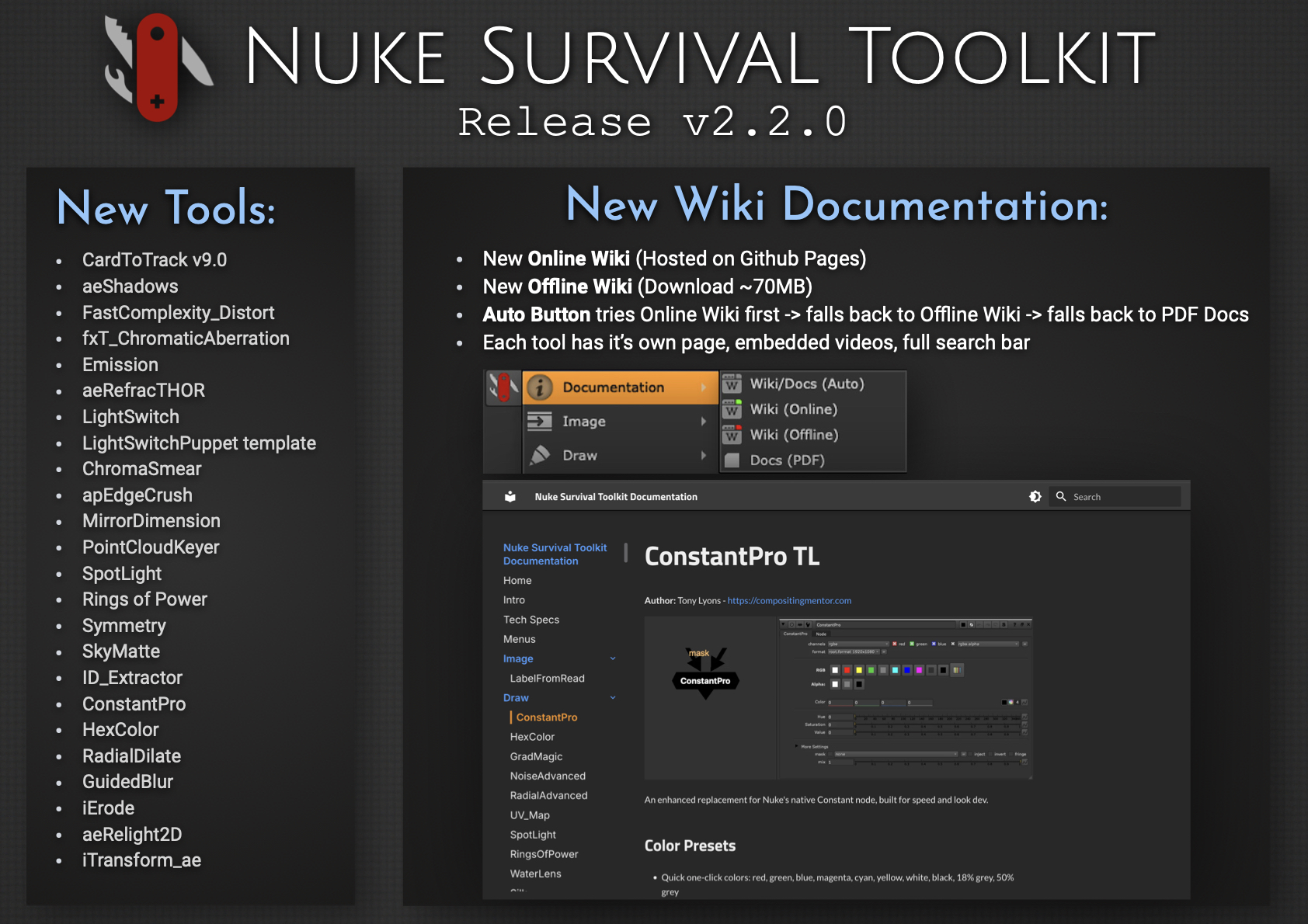
Every once in a while, you take on an ambitious project, bite off more than you can chew, and learn a lot along the way… 😅

I’m excited to release Nuke Survival Toolkit v2.2.0, now featuring a brand-new Online Wiki, replacing the previous Google Docs setup. Each tool now has its own dedicated page with embedded videos and images, along with a fully functional search bar.

For folks working in internet-restricted environments, there’s also a downloadable Offline Wiki (~70MB). It mirrors the online version (minus video embeds), so you can browse everything locally without internet access. The PDF documentation is now generated directly from the wiki, ensuring it always stays in sync.

Converting the Google Docs to a full wiki, packaging an efficient offline version, and maintaining a dynamic PDF pipeline was… a challenge. But it is now a well oiled system that is easy to update. This process also gave me a deeper appreciation for the effort behind maintaining high-quality documentation, credits, references, and educational resources. Kudos to all you Wiki warriors out there.

Hope the new wiki helps you find tools faster or discover ones you didn’t know were there.


New Documentation System
– Live Online Wiki (replacing the previous Google Docs)
– Dedicated page for each tool
– Embedded videos, GIFs, images, and links
– Full search functionality for quickly finding tools
– Downloadable Offline Wiki (~70MB) for offline use (no video embeds)
– PDF documentation generated directly from the wiki (always in sync)
– Updated NST menu documentation launcher
– Auto mode: Online Wiki → Offline Wiki → PDF

What else is new since v2.1.0?
– 27 new tools added
– 44 tool updates, including a Nuke 13+ python2 to python3 sweep
– Nuke 16 & PySide 6 compatibility for all tools needing upgrade
– New CardToTrack v9 release supported (works on Nuke 16)
– 11 targeted issue fixes & cleanup: ie. improved Windows path handling

Link to the new NST Release page:
https://github.com/CreativeLyons/NukeSurvivalToolkit_publicRelease/releases/tag/v2.2.0

Link to the New Online Wiki Documentation:
https://creativelyons.github.io/NukeSurvivalToolkit_Wiki/

Link to both Github Repos:
NST: https://github.com/CreativeLyons/NukeSurvivalToolkit_publicRelease
NST Wiki: https://github.com/CreativeLyons/NukeSurvivalToolkit_Wiki

The Foundry Nuke: Gizmo Creation – Tips and Tricks

Hi everyone,

The Foundry has recently published a video I created for them earlier this year, Gizmo Creation: Tips and Tricks. Let me know if you found them useful, hopefully there will be more parts in the future. Thanks!

I will just grab the great description from the video the Foundry has provided:

Gizmos are user-created super-tools in Nuke, which are an easy way to package up parts of your node graph into a single group – or Gizmo – so that it can be shared across projects, teams, and Nuke Scripts.

In this video, Tony Lyons gives an insight into how he creates Gizmos in Nuke.

He starts with the User Knob Interface and how it’s been revamped, making Gizmo creation more straightforward and faster than ever before.

Tony then looks at how we can elevate the flexibility and versatility of our Gizmos by adding multiple inputs and a switch node so you can switch between inputs easily.

He also touches on how parameters from nodes within your Gizmos can be added to the Gizmo itself, allowing you to adjust things from the node graph without needing to dive into your tools to find a specific knob tweak.

Want to know more about Gizmos? Check out

https://learn.foundry.com/course/1023…
https://learn.foundry.com/course/6585…

Want to see more of Tony Lyons? Check out https://www.creativelyons.com/

Interested in Nuke? Try it for free here! https://www.foundry.com/products/nuke…

Chapters 0:00
Introduction 0:31
User Knob Editing Toolbar 1:29
Linking Parameters Between Nodes 3:27
Changing Knob Properties 4:28
Speed Up Gizmo Creation 5:13
Customising Input Names 8:01
Changing the Default Input 10:50
Switching Between Multiple Inputs 14:52
Adding Mix and Mask Options 20:13
Adding Channel Options

About Us: We are the creators of industry-standard visual effects, computer graphics and 3D design software for the Digital Design, Media and Entertainment industries. Since 1996, Foundry has strived to bring artists and studios the best tools for their workflows so they can battle industry constraints whilst staying creative. Subscribe to our channel and get the latest news, tutorials, webinars and updates from the Foundry team.

New NukeSurvivalToolkit Release v1.1.0

Published new v1.1.0 Release of NukeSurvivalToolkit


Added some new tools, fixed some bugs.
For all interested what was updated:

If your interested in the new tool additions highlights, check out this bulletin: https://drive.google.com/file/d/1WziZXM8LSmJxibYckvUV9jbvcLgExUuk/view

Full Release Notes v1.1.0 found here: https://drive.google.com/file/d/1nb_DfkYn44yqc30gD34aEEV3zlh_-shP/view?usp=sharing

Link to new release v1.1.0 download page: https://github.com/CreativeLyons/NukeSurvivalToolkit_publicRelease/releases/latest

If you already have the package installed, should be as easy swapping out the old folder with the new one. In the future I plan to do a monthly release update, given there is enough material to add, bug fix, change, etc.

Please let me know if there are any tools you think I missed and would make a good addition in the comments, as well as any bugs or unusual behavior. Thanks